MCP Resource vs Tool vs Prompt Primitives Explained
Control over when each primitive runs determines whether your MCP server works across clients.
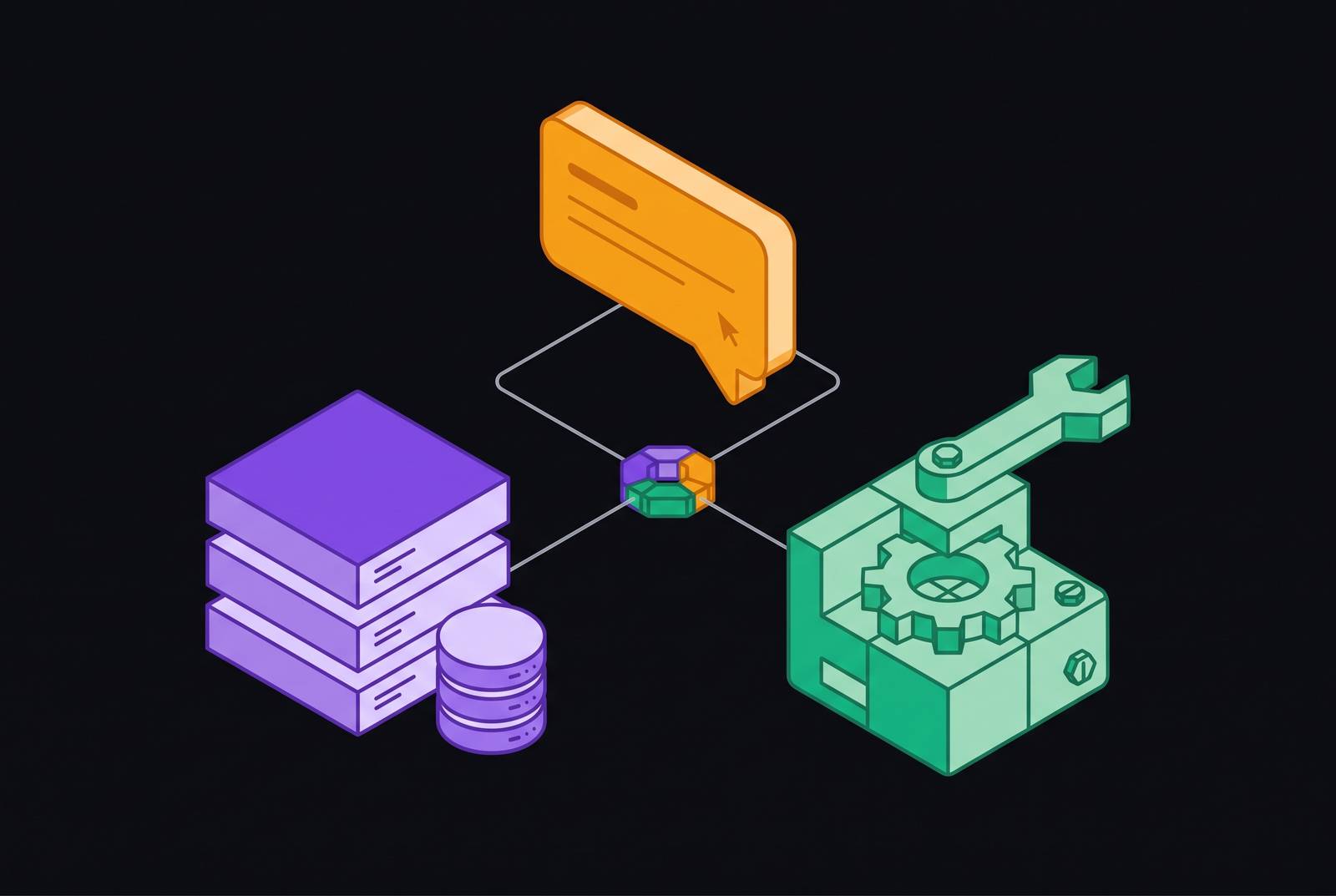
MCP gives an AI agent exactly three ways to connect to the outside world: Tools, Resources, and Prompts. Mix them up and a server that runs fine in Claude Desktop falls over in Cursor, or worse, a model quietly does something destructive it was never supposed to touch. More documentation doesn't fix that. Understanding one distinction that most builders skip past on their way to writing code does.
Anthropic introduced the Model Context Protocol in November 2024, built by David Soria Parra and Justin Spahr-Summers on a client-host-server pattern borrowed from the Language Server Protocol. Before MCP, every integration between an AI system and an external tool or data source was custom wiring, and every team solved the same connection problem with incompatible approaches that didn't survive contact with a second client. MCP's fix was three primitives that cover everything an agent might need: something to do, something to see, and something to follow. The spec keeps moving; the stable release is 2025-11-25, with a 2026-07-28 release candidate already out.
The one principle that separates all three primitives: who controls invocation
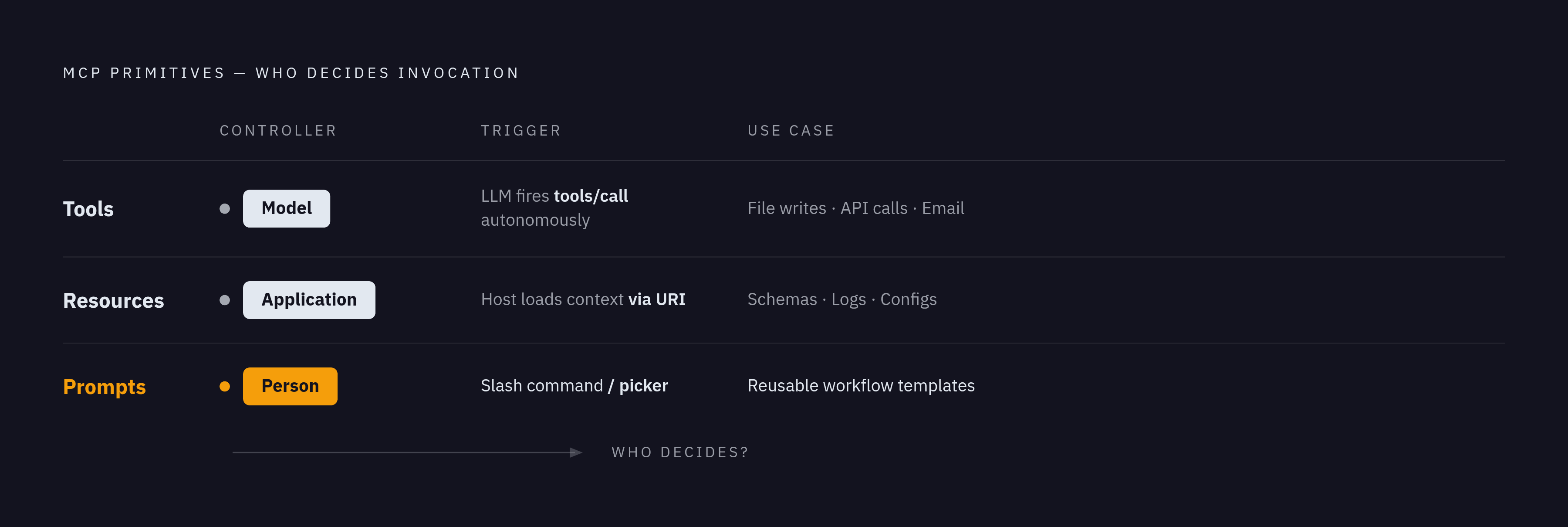
Here's what trips up almost everyone building their first MCP server: the difference between Tools, Resources, and Prompts has almost nothing to do with what data they carry. It's about who decides when they get used.
Tools are model-driven. The LLM looks at the conversation, decides it needs to do something, and calls the tool on its own, no human in the loop at that moment. Resources are application-driven; the host or IDE decides what context to load, often before the model has said a word. Prompts are user-driven, picked deliberately by a person, usually through a slash command or a menu item in the client.
Most builders treat this as a naming quirk. It isn't. Three primitives, three different control surfaces, three different failure modes if you get the wrong one. Hold that frame before anything else about this protocol makes sense: each primitive follows the same discovery pattern, a */list call to see what's available, then either */get or tools/call to retrieve or run it. But the mechanics are identical across all three. The control question is the only thing that isn't.
Tools: executable functions the model decides to call
A Tool is a function with a JSON Schema attached. The server advertises it through tools/list, the client hands the definition to the model, and the model decides on its own when to fire tools/call. File operations, API calls, database writes, sending an email, posting to Slack: anything that changes something in the world belongs here, and nowhere else.
Side effects are the whole point of a Tool. That's exactly why most hosts insert a confirmation step before anything actually runs. The 2025-03-26 spec revision added Tool Annotations to make that confirmation step smarter: a human-readable title, a readOnlyHint for tools that never write, a destructiveHint for anything potentially irreversible, an idempotentHint for calls safe to repeat, and an openWorldHint for tools touching unpredictable external systems. Treat these as hints, not contracts, because a model or a malicious server can lie about them. Annotations should never be the only thing standing between a Tool and unauthorized access.
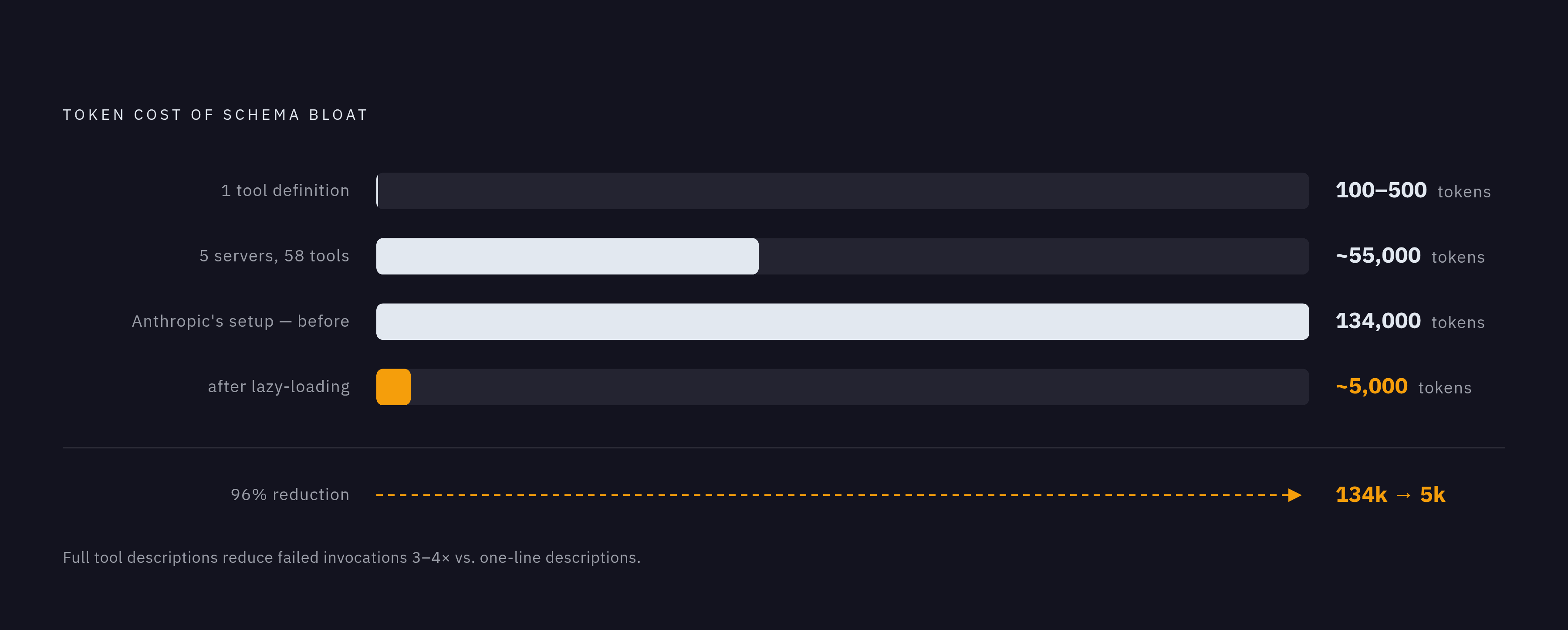
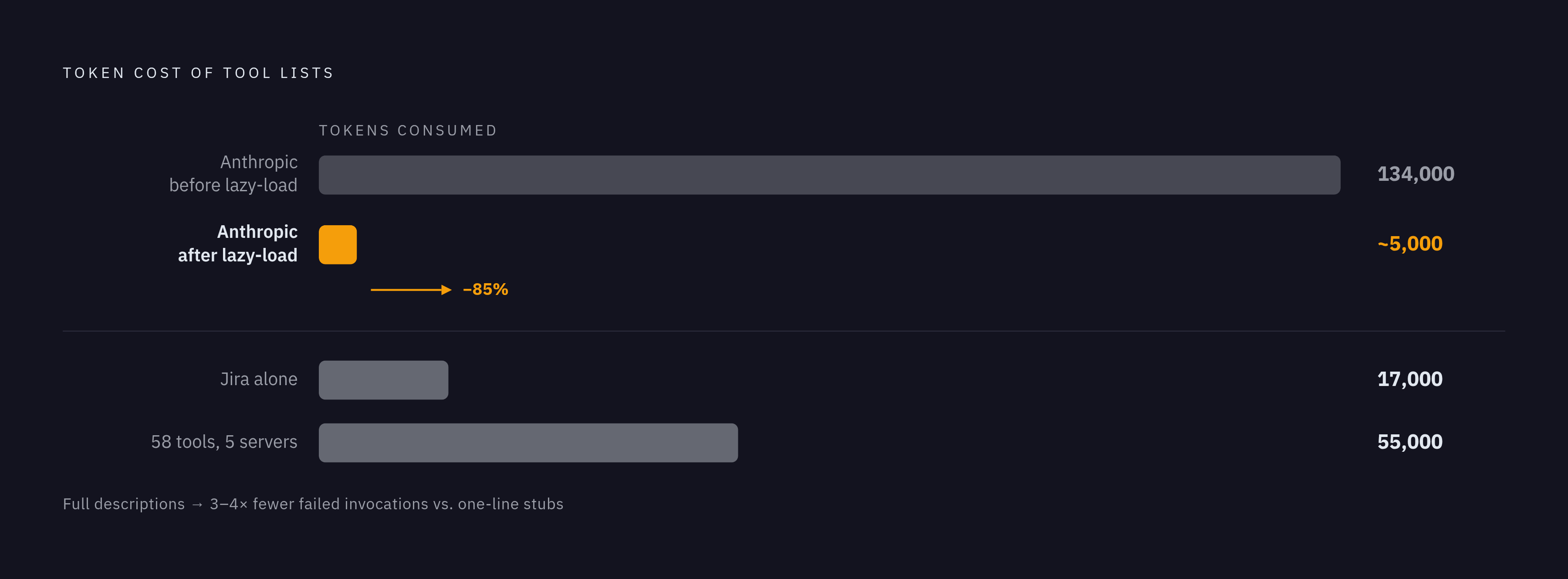
Then there's the token problem, and it's worse than most builders expect. A single tool definition costs somewhere between 100 and 500 tokens just to describe. Wire up five servers with 58 tools between them and that's roughly 55,000 tokens spent before the model has done anything; Jira's tool set alone has been measured at 17,000 tokens on its own. Anthropic's own engineering team found tool definitions eating 134,000 tokens in one setup before optimizing; adding lazy-loading through MCP Tool Search brought that down to around 5,000, a cut of roughly 85%. That's not just a context-window budget problem. Schema bloat makes it harder for the model to pick the right tool in the first place, since it's sorting through noise to find signal.
Most teams underrate description quality, and it costs them. Tools with full, clear descriptions show something like three to four times fewer failed invocations than tools stuck with a one-line description. Cross-client compatibility is its own minefield, too: optional fields and $ref combinations that pass fine in Claude Desktop can hard-fail in Cursor or VS Code Copilot, which is part of why the 2025-11-25 spec now defaults any schema missing a $schema field to JSON Schema 2020-12.
Because Tools are model-driven and carry side effects, they need the most governance of the three: access controls, rate limits, an audit trail. The model's autonomy is the whole value proposition here, and it's also exactly what makes an ungoverned Tool dangerous.
Resources: read-only, addressable data the application loads for context
A Resource is a piece of data with a URI. It's read-only, deterministic, and never produces a side effect. File contents, a database schema, application logs, a config file, an API response captured as static context: that's Resource territory, full stop.
Each Resource gets a unique address, something like file:///path/to/document.md, plus a MIME type so the client knows whether it's handling Markdown, JSON, a PDF, or something else. Resources come in two flavors. Static resources are fixed, like a greeting message or a snapshot of a config file. Dynamic ones use URI templates following RFC 6570, so a server might expose db://tables/{table_name}/schema or logs://app/{date}/errors and fill in the blanks on request.
Resources can also push updates. Through resources/subscribe, a server sends a notifications/resources/updated message when the underlying content changes, which is what makes live config reloading or file-watching patterns possible without polling.
Builders ask this constantly: what's actually different between a Resource and a Tool that just fetches data? Control, again. A Tool that fetches data gets called by the model, mid-reasoning, because it decided it needed that data right then. A Resource gets loaded by the application before the model even starts running. One is deterministic context injection, chosen ahead of time; the other is a dynamic action the agent triggers itself.
Resources are the least mature primitive in terms of real client support, and that's worth saying plainly. The spec is thorough, with annotations, subscriptions, and templating all defined, but plenty of clients don't fully expose any of it yet. Resources pair naturally with Prompts, which is the next primitive worth unpacking: the Resource supplies the data, the Prompt supplies the reasoning template that makes sense of it.
Prompts: reusable, user-selected templates that shape how the model behaves
A Prompt is a message template the server defines, with named arguments filled in before the model ever sees it. A person selects it, usually through a slash command or a picker in the UI. Neither the model nor the application chooses it quietly in the background; that's the whole distinction.
The mechanics are simple. The server announces prompt support during initialization through capabilities.prompts.listChanged. The client calls prompts/list to see what's on offer, and each entry comes with a name, a description, and a list of required arguments. A user picks one, the client calls prompts/get with the arguments filled in, and the server hands back a structured set of messages ready to go.
Where a Tool executes logic and a Resource hands over raw data, a Prompt returns a predefined message sequence built to kick off consistent, repeatable behavior. The arguments work like variables in a template: the server defines the shape, the client fills in specifics, and the model receives something fully formed instead of half-baked.
Resources and Prompts do their best work together. A Prompt can reference a Resource directly, so the Resource supplies the schema or the data and the Prompt supplies the reasoning instructions layered on top. Together they give the model both the material to work with and clear instructions for what to do with it.
Prompts also handle something Tools can't do well on their own: multi-step orchestration. A single Tool handles one task, full stop. A Prompt can walk through a sequence, passing data between steps, mixing computed steps with model-reasoned ones, without forcing the model to reinvent the workflow from scratch every run. And because Prompts are declarative, they're composable in a way ad hoc instructions never are. They get versioned on the server, updated without touching the client, and reused across every agent that connects to it.
How the three primitives work together in a single server
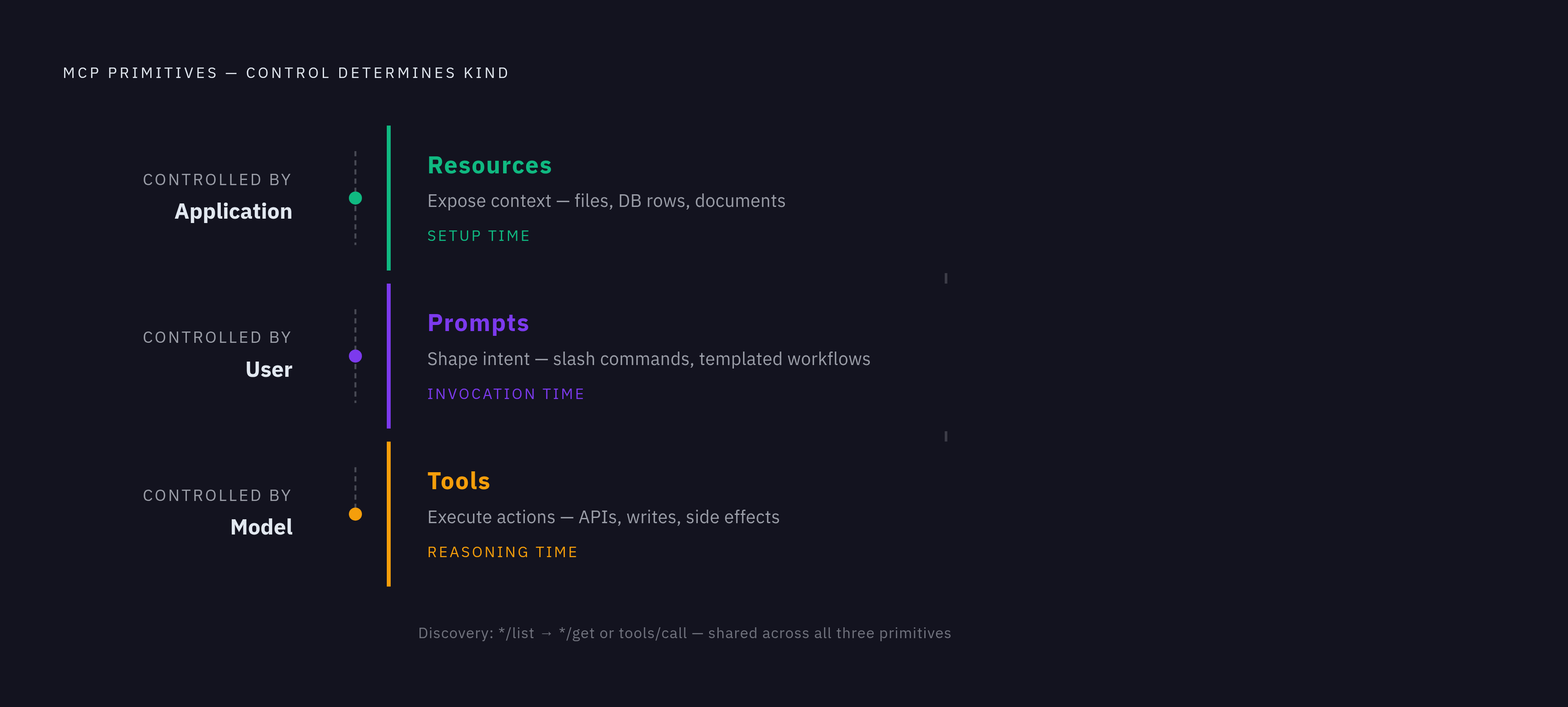
The MCP spec's own example is a database server, and it's a clean illustration of how these three pieces fit together rather than compete. The Resource is the database schema: static, addressable, loaded by the client so the model already knows the shape of the data before it does anything. The Tool is a query executor, something the model reaches for when it decides it needs specific records. The Prompt is a set of few-shot examples showing how to use that query tool well, something a user selects to prime the model with the right reasoning pattern before it starts working.
None of these three compete for the same job. They occupy different moments in the same workflow: the Resource loads context at setup time, the Prompt shapes behavior at invocation time, and the Tool executes the action during reasoning.
Discovery stays consistent across all three, tools/list, resources/list, prompts/list, same pattern every time, with servers declaring during initialization which primitives they actually support so clients know what to ask for. The transport layer is shared too. Whether it's stdio for a local, same-machine setup or Streamable HTTP for a remote, multi-client connection over HTTPS and SSE, both carry all three primitive types without any structural difference. The distinction between Tools, Resources, and Prompts is logical, not architectural.
Other server capabilities build on top of this same foundation rather than sitting beside it. Sampling lets a server request LLM inference from the client. Elicitation lets a server ask a user for more information mid-task. Roots limit filesystem scope. All three depend on the primitive structure already being in place.
Why the ecosystem over-indexes on Tools and what that costs builders
Scroll through the MCP catalog, browse a handful of tutorial repos, look at any community showcase: it's Tools, Tools, and more Tools. Prompts are often missing entirely, or reduced to something trivial. Resources are underbuilt almost everywhere.
That imbalance isn't an accident, and it isn't really a mystery either. Tools are easy to demo: call one, get a visible result, done. Prompts require actually thinking through a multi-step workflow, which is more design work than most tutorials bother with, and SDK support for Prompts is thin. Most SDKs still treat them as flat message lists, with no real support for data flow or mixed execution across steps. Even Anthropic's own blog didn't publish its first post on using Prompts for automation until mid-2025, months after the protocol itself shipped. The ecosystem followed the tutorials, not the spec, and that's the real problem here, not a lack of documentation.
The cost is concrete. Context that should get loaded once, through a Resource, ends up getting re-fetched by a Tool on every single agent run, burning tokens and adding latency for no reason at all. Reasoning patterns that could live as a versioned, shareable Prompt get hardcoded into system messages instead, or rediscovered from scratch every session. The model ends up doing orchestration work a Prompt could have handled declaratively, with zero reasoning required.
It compounds. A server that fetches everything through Tools instead of exposing proper Resources adds to the exact schema bloat that degrades tool selection accuracy in the first place; it's the tail eating itself, since adding more tools was never the fix for a token problem caused by too many tools. Build Tools for what changes state, reach for a Resource when the job is exposing data, and reach for a Prompt when the job is keeping a workflow consistent across sessions and users. Anything less is just more Tools patched over a Resource-shaped hole.
Choosing the right primitive: a decision framework for builders
Once the control-surface principle is in place, routing decisions get simple. Will this change state or run logic? That's a Tool. Will this hand the model something to read, with zero side effects? That's a Resource. Will this shape how the model behaves across a workflow a person chose to run? That's a Prompt.
Miswiring shows up in a few predictable shapes. A read-only database lookup wrapped as a Tool forces the model to decide something that should've just been loaded as context, adding decision overhead and token cost for nothing. A system prompt hardcoded into the host application, when it could live as a server-side Prompt instead, loses every bit of versioning and reuse the protocol was built to offer. A single bloated Tool that fetches data, formats it, and performs an action all at once should really be three things: a Resource for the context, a Prompt for the formatting guidance, and a Tool for the action itself.
Annotations deserve attention at design time, not as an afterthought once something breaks. Deciding on readOnlyHint, destructiveHint, and idempotentHint while writing a Tool forces a builder to be honest about what it actually does, and what oversight it actually needs.
That question of oversight gets sharper at scale. Tools need access controls, rate limits, and real-time visibility into what's actually being called, since the model's autonomy over invocation makes an ungoverned Tool the riskiest surface in the whole system. Resources need URI-level access policy: who's allowed to load which data into which agent's context window. Prompts need version control and an audit trail of their own, since a quiet update to a Prompt can change agent behavior across every client connected to that server, without anyone noticing until something's already gone wrong.
This is where a governed gateway earns its keep. Enforcing policy at the primitive level, controlling which agents can call which Tools, subscribe to which Resources, and invoke which Prompts, turns these design choices into something enforceable at runtime instead of a diagram on a whiteboard. MCP Manager, built on Usercentrics' data governance work, serves that layer: an audit trail and access controls that make tool invocation something a team can actually see and control, rather than something they have to hope is behaving correctly.